The Unreliable World of Open Email Tracking

By Mriganka Bhuyan
•Founder at Munch
Open email tracking used to be the sales rep's secret weapon. Now? It’s more like a magic 8-ball. Fun to shake, but you probably shouldn't base your entire strategy on its answers.
So, is open tracking dead? Not exactly. But it's definitely been misunderstood, and clinging to the old definition is a recipe for disaster.
Is Open Email Tracking Dead or Just Misunderstood?
Ever seen a campaign with a 90% open rate but your inbox is a ghost town? It feels like throwing a massive party where everyone RSVPs 'Yes,' but the only person who shows up is your cousin Steve from accounting. That’s the new reality of open email tracking.
The metric isn't dead, but its meaning has completely changed. Think of it less like a confirmed "read receipt" and more like a blurry photo of Bigfoot. You might have a sighting, but it's hardly concrete evidence. Sales teams still treating every "open" as a hot lead are chasing phantoms down a cold trail.
The Invisible Spy in Your Inbox
So, how does this digital sorcery even work?
At its core, open tracking uses a tiny, invisible 1x1 pixel image tucked away in the email's code. This little pixel is a digital spy, hiding in plain sight. When an email client like Outlook or Gmail loads the images in your message, it has to fetch that pixel from a server.
That request is the tripwire. The server logs the request, and voilà, it's marked as an "open." For years, this was a slick way to get a pulse on your outreach. For example, if you sent a proposal and the pixel loaded, you could be reasonably sure a human had laid eyes on your message.
But then, the villain of our story entered the scene and flipped the table.
Apple’s Privacy Changes Everything
In 2021, Apple introduced Mail Privacy Protection (MPP) with iOS 15, and it completely rewrote the rules of the game. MPP acts like an overeager bouncer at a club, pre-fetching all the content before the guest even decides to come inside.
Here’s what happens now:
-
Automatic Downloads: The moment an email hits an Apple Mail inbox, Apple's own servers automatically download all of its content, including our sneaky little tracking pixel.
-
Masked Activity: This download happens in the background, completely disconnected from whether the user actually opens the email. It could be sitting unread for days.
-
Inflated Numbers: The result? Nearly every email sent to an Apple Mail user on a newer device gets flagged as "opened." This creates a massive wave of false positives that can make your open rates look incredible while being completely meaningless.
This inflation sends sales reps on wild goose chases, following up on "opens" from people who never even saw their email. An "open" no longer means a person read your message; it just means an Apple server scanned it. You can learn more about how to improve email deliverability and navigate this new landscape.
The shift has been dramatic. A quick look at the "before and after" shows just how much the definition of an "open" has changed.
Open Email Tracking Then vs Now
| Metric/Concept | The Old Way (Pre-2021) | The New Reality (Post-MPP) |
|---|---|---|
| What an Open Meant | A strong signal that a human likely viewed your email. | A weak signal that the email was delivered and processed by a server. |
| Data Reliability | Generally reliable, with some exceptions (images blocked). | Highly unreliable, with massive numbers of false positives. |
| Sales Action | Justified a follow-up call or a priority task. | Requires additional signals (clicks, replies) before taking action. |
Simply put, what was once a green light for follow-up is now barely a yellow. Relying on it alone is like driving with your eyes closed. You need other, more concrete signals to know who's really engaged.
How Open Email Tracking Actually Works Under the Hood
Ever wonder how your sales software knows the exact moment a prospect opens your email? It's not magic, though it kind of feels like it. The real secret is surprisingly low-tech and relies on a tiny, invisible stowaway.
When you send a tracked email, your platform tucks a microscopic, 1x1 pixel image into the email's code. Think of it as a digital tripwire. It's completely invisible to the naked eye, but it’s the key to the whole operation.
The moment your prospect's email client (like Gmail or Outlook) loads the images in your message, it has to fetch that little pixel from a server. That "fetch" request is the signal. It pings your sales software, which then triumphantly marks the email as "opened." For years, this was the industry's clever, behind-the-scenes way to gauge engagement. But the game has changed, and our trusty tripwire now has a few major flaws.
The Problem of the Missing Pixel
First up is the dreaded false negative. This is when a prospect reads every single word of your carefully crafted email, but your dashboard shows... nothing. Crickets. It’s like they ghosted you, but you have no idea if they even saw your message.
This usually happens because their email client is set to block images from loading automatically. For instance, many companies in finance or healthcare enable this by default to protect their systems. Privacy-savvy individuals do it too.
-
Pixel Never Loads: If the email client blocks images, your tracking pixel never gets called home.
-
No "Open" Signal: Without that server request, your platform never gets the memo.
-
You're Left in the Dark: You end up with a genuinely interested prospect who looks completely cold in your system.
You might ditch a promising lead, thinking your subject line flopped, when in reality, the message landed perfectly. Frustrating, right? But it gets worse.
The Tsunami of False Positives
A much bigger, more data-distorting problem today is the false positive. This is when your system shouts, "We've got an open!" while your email is actually just sitting unread in a cluttered inbox. The main culprit? Apple’s Mail Privacy Protection (MPP).
Launched to give users more privacy, MPP basically pre-loads all email images through its own proxy servers. This happens automatically the second the email hits the inbox, way before the recipient ever lays eyes on it.
This means Apple’s servers request the tracking pixel for nearly every email sent to a modern Apple device, triggering an "open" event automatically. It's not a person opening your email; it's a robot doing a routine privacy check.
This process single-handedly creates a tidal wave of junk data, making open rates look fantastic while masking the truth about your campaign's performance.
This flow chart shows how that simple tripwire signal gets hijacked by privacy features before it ever reaches you.
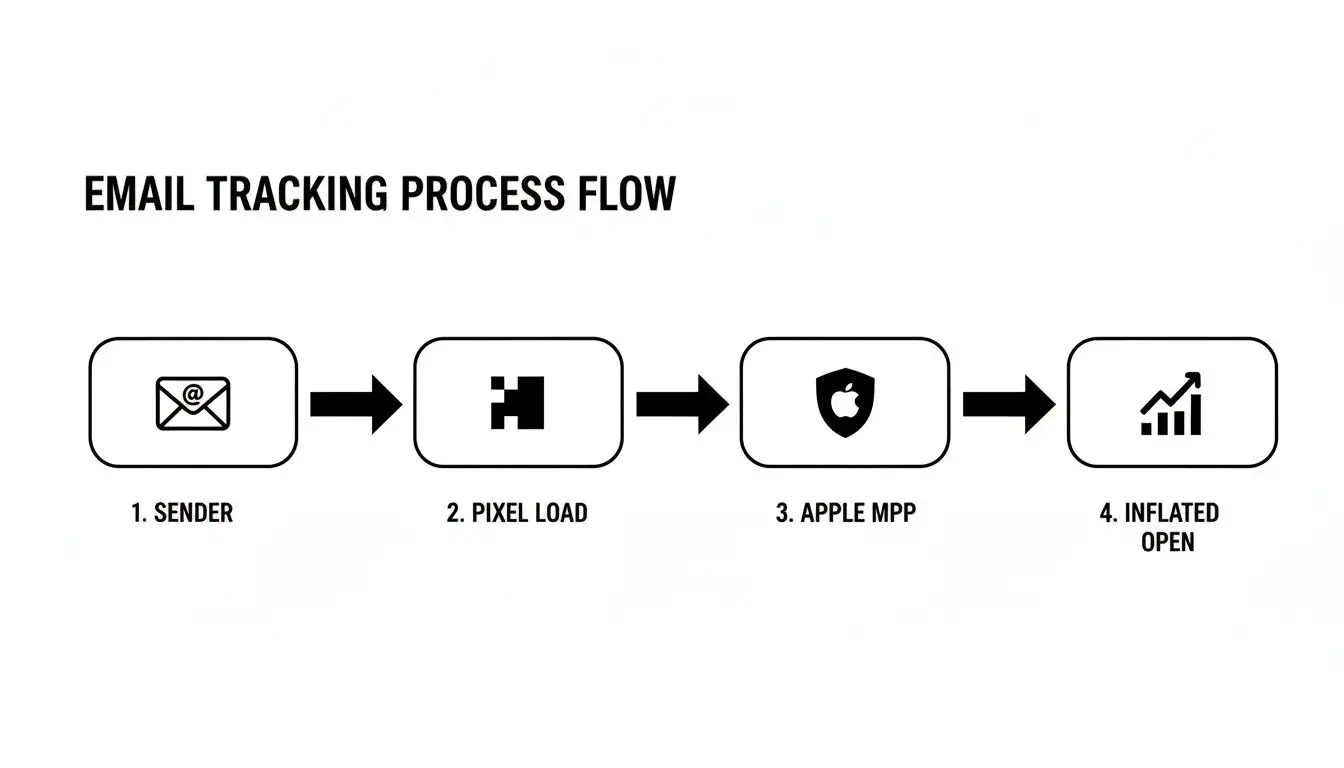
The big lesson here is that features like MPP have wedged themselves between your prospect's actions and the data you see. That’s why relying solely on opens is a recipe for disaster. You have to look deeper, which is why it's so critical to track website visitors who actually click links in your emails. That's a signal you can still trust.
The Great Open Rate Inflation of Our Time
If you’ve glanced at your email stats lately, you might feel like a sales rockstar. Open rates are through the roof! But before you start printing those "Sales Guru of the Year" t-shirts, we need to have a little chat. Those numbers are lying to you, and the main culprit is Apple's Mail Privacy Protection (MPP).
Launched with iOS 15 back in September 2021, MPP is like a digital bodyguard for your inbox. It completely changed the game for open email tracking, creating a fog of war where you can't tell genuine interest from automated noise. It’s the reason your "stellar" open rates aren't turning into actual conversations.
How Apple Rigged the Game
So, what exactly is this privacy feature doing behind the curtain? When an email hits an Apple Mail user’s inbox, MPP grabs it and reroutes it through a proxy server. This server then automatically downloads all the email's content, including our tiny tracking pixel, before the message ever even lands in their inbox.
This means pretty much every single email you send to an Apple Mail user on a modern device gets instantly marked as "opened" by your sales software. It's like your prospect's phone is lying to you on their behalf. The "open" signal is triggered by an Apple server, not a human eyeball.
Your system sees an "open" and thinks, "Success!" But in reality, that email could be sitting unread, buried under a mountain of other messages. It’s an automated action completely disconnected from human intent.
This wasn't some subtle shift. It was like one day everyone on your list collectively decided your subject lines were pure gold. The truth, of course, is a lot less glamorous; the game was simply rigged.
The Numbers Don't Lie (But They Do Deceive)
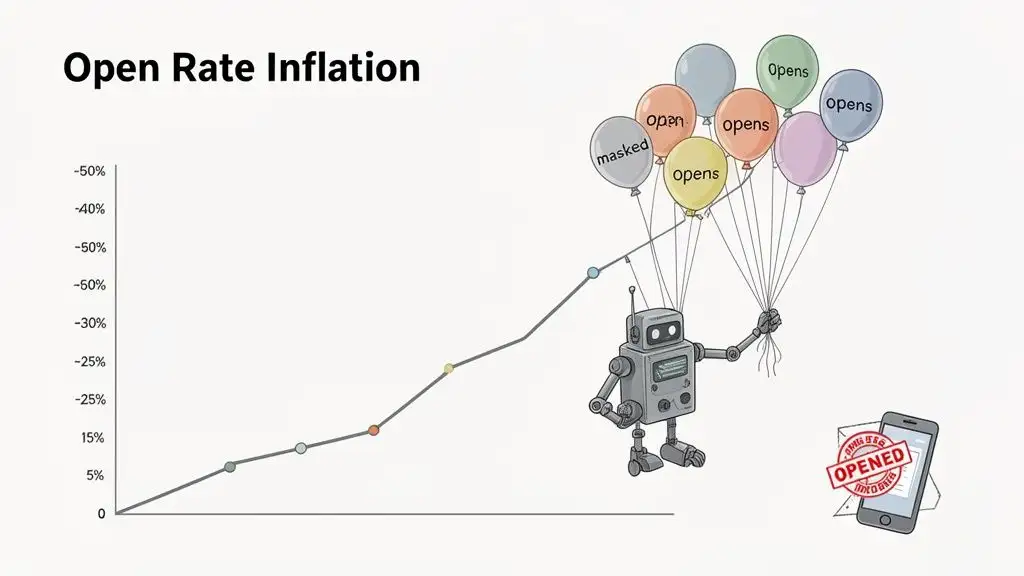
The impact of MPP was both immediate and massive. Almost overnight, sales and marketing teams watched their open rates rocket from realistic figures to unbelievable heights. A campaign that used to pull in a healthy 20-25% open rate was suddenly boasting 40-50% engagement.
This wasn’t because sales reps everywhere suddenly became master wordsmiths. It happened because a huge chunk of their audience, specifically, the 50%+ of email users who open mail on Apple devices, was now automatically tripping the tracking pixel.
Recent data shows just how wild these numbers have gotten. In 2026, the average email open rate across industries is hovering around 42-43%, a figure propped up almost entirely by privacy features like MPP. Before 2021, those rates sat comfortably in the low 20s, a much better reflection of genuine interest.
The Problem with Phantom Engagement
This artificial inflation creates a huge headache for sales teams. When you can’t trust your open rates, you start making bad decisions.
Here’s how it messes up your workflow:
-
Wasted Time: Reps spend hours chasing "phantom opens," following up on prospects who never actually laid eyes on their email. That's precious time that could be spent on leads who are actually engaged.
-
Flawed Prioritization: Leads who trigger a fake open get bumped to the top of the list, pushed ahead of others who might be more interested but don't use Apple Mail. You end up focusing on the wrong people for all the wrong reasons.
-
Inaccurate Campaign Analysis: Forget about A/B testing subject lines. You can't measure effectiveness if half your data is junk. You might think a terrible subject line is a winner just because it went to a list full of iPhone users.
To navigate this new reality, you have to shift your focus away from vanity metrics and toward signals that can't be faked. While an "open" has become unreliable, you can still track other important lead generation KPIs to measure what's really happening. It's time to look past the smoke and mirrors and find the metrics that actually move the needle.
Smarter Metrics That Actually Drive Sales
So, we've all agreed that staring at your email open rate is like trying to tell the time with a broken clock. It might be right twice a day, but you'll never know when. If those inflated opens are just a vanity metric, which numbers actually put money in your pocket?
It's time to stop worrying about the problem and start focusing on the solution. Let's talk about the signals that can't be faked by privacy bots or phantom server opens: the ones that show a real, live human is actually interested. These are the tells that a prospect is leaning in, not just letting their iPhone rack up opens for them.
Click-Through Rate: The Proof of Life
First up is the king of concrete actions: the Click-Through Rate (CTR). If an open is a blurry photo of a UFO, a click is a high-definition video of the landing. It’s a deliberate, conscious action that simply can't be faked by a privacy filter.
No one "accidentally" clicks a link to your case study, pricing page, or demo scheduler. Think of it as your "proof of life" metric. A click means someone didn't just see your email; they were intrigued enough to take the next step. For example, a prospect clicking a link to a specific case study about their industry is a clear signal they have a problem you might be able to solve. They effectively raised their hand and said, "Okay, you've got my attention." That's a powerful signal.
Click-to-Open Rate: Your Noise-Canceling Headphones
Next, let's look at the Click-to-Open Rate (CTOR). This little metric is your secret weapon for cutting through all the MPP-fueled chaos. CTOR measures the percentage of people who opened your email who also clicked a link. It answers the most important question of all: "Of all the people who supposedly saw my message, how many actually cared enough to do something?"
Let's make this real. Imagine you have a 50% open rate but only a 2% CTR. That looks pretty weird, right? But if your CTOR is a healthy 4%, it tells you that your message is actually resonating with the people who truly saw it. A high CTOR, even with a wacky open rate, means your email body and call-to-action are on point. A low CTOR, on the other hand, is a major red flag that your message isn't landing.
CTOR is how you filter out the machine "opens" from the human ones. It's like being a judge on a reality TV show: you're not just looking at who showed up to audition (the open), you're looking for who actually has talent (the click).
Reply Rate: The Ultimate Engagement Signal
And now, the holy grail of B2B sales outreach: the Reply Rate. This is the one that really counts, because it means a conversation has officially started. A reply, whether it's "Tell me more" or even "Not a fit right now," is pure gold. You’ve opened a direct line to your prospect.
A positive reply is an obvious win, but even the negative ones are incredibly useful. "Unsubscribe" or "Not interested" helps you clean your list and stop wasting time on the wrong leads. A reply is the ultimate goal because it shifts the dynamic from a monologue to a dialogue. Frankly, it's the metric that pays the bills.
By tracking replies, you can start to understand which prospects are truly engaged. You can learn more about how to prioritize these high-intent leads in our guide on lead scoring best practices.
B2B Sales Metrics That Actually Matter
To cut through the noise of inflated open rates, savvy sales teams are focusing on metrics that signal genuine human engagement. Here’s a quick breakdown of what you should really be tracking.
| Metric | What It Measures | Why It's Better Than Open Rate |
|---|---|---|
| Click-Through Rate (CTR) | The percentage of recipients who clicked a link in your email. | A click is an intentional action that can't be faked by privacy bots. It proves genuine interest. |
| Click-to-Open Rate (CTOR) | The percentage of openers who also clicked a link. | This filters out inflated opens and tells you if your message is compelling to actual readers. |
| Reply Rate | The percentage of recipients who replied to your email. | The ultimate signal of engagement. It starts a real conversation, good or bad. |
| Meeting Book Rate | The percentage of emails sent that resulted in a booked meeting. | This is the bottom-line metric. It directly ties your outreach efforts to sales pipeline. |
| Unsubscribe Rate | The percentage of recipients who opted out of your emails. | Provides direct, unfiltered feedback that your targeting, messaging, or frequency is off. |
Ultimately, focusing on these metrics helps you build a sales process based on real intent, not digital ghosts.
Pro Tip: Use Munch to fetch validated email ids for your prospects and let our AI agents research each of your leads and craft personalized emails that get replies!
Other Valuable Signals to Watch
Beyond the big ones, a few other signals help paint the full picture of your campaign's health.
-
Meeting Book Rate: This is the bottom line. How many emails led directly to a booked demo or discovery call? It’s the ultimate conversion.
-
Unsubscribe Rate: A high unsubscribe rate is the market screaming at you. It’s a clear sign that your targeting, messaging, or frequency is wrong, and you'd be a fool not to listen.
Even with all the privacy inflation, open rates still tell a story of industry differences. B2B software, for example, averages around a 36.20% open rate, while consulting hits 39.08%. These numbers, skewed as they are by Apple's MPP and Gmail's caching, just hammer home why modern sales intelligence tools are so vital for focusing on metrics you can actually trust.
So, What Do You Do With Tracking Data in Your B2B Sales Workflow?
Alright, so we've established that open rates are flaky. They're about as reliable as a weather forecast in London. But does that mean we should just chuck all our tracking data in the bin? Not so fast. Even a flawed metric can be a goldmine if you know how to read the signs.
This is your modern playbook for sifting through the noise of B2B tracking data to find the real buying signals. It's about working smarter, not just chasing ghosts.
The Canary in the Coal Mine
Before you write off open rates for good, let’s give them one last, crucial job: being your deliverability smoke detector. Sure, a single open doesn't mean much, but a complete lack of opens across an entire campaign? That's a massive red flag.
Think about it. If you send 100 emails and get a 0% open rate, the odds that every single person conspired to ignore you are pretty slim. That’s not a messaging problem; it’s a technical one. A flatline on your open rate almost always means one thing: your emails are taking a one-way trip to the spam folder.
An open rate of zero isn't a sign of a bad subject line; it's a sign that your emails never even had a chance to be read. It’s your system’s way of screaming, “Houston, we have a deliverability problem!” before you waste weeks on a broken campaign.
This is where the metric still has some punch. Use it as a quick diagnostic. If you see nothing but zeroes, it's time to pop the hood and check your domain reputation, authentication records (like SPF and DKIM), and your email copy for any spam triggers.
Creating a Hierarchy of Engagement
Once you've confirmed your emails are actually hitting inboxes, it's time to get strategic. You have to prioritize your time based on signals that actually mean something. Not all prospect actions are created equal, and treating a simple open with the same urgency as a direct reply is like calling the fire department because you slightly burned your toast.
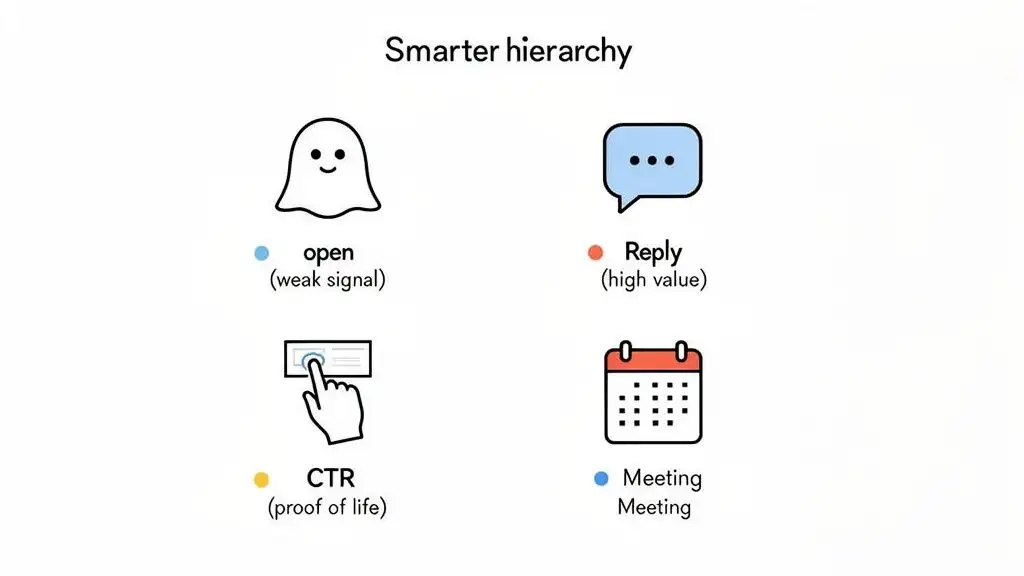
Here’s a simple, tiered system to guide your follow-up game:
-
Tier 0 Signal (The Reply): This is the holy grail. A prospect actually took the time to write back. Drop what you're doing and have a real conversation. It’s go time.
-
Tier 1 Signal (The High-Intent Click): Bingo. They clicked a link to your pricing page, a case study, or your "Book a Demo" calendar. This is a strong buying signal and calls for a prompt, personalized follow-up within a few hours.
-
Tier 2 Signal (The Low-Intent Click): A click on a blog post or your company’s homepage shows a flicker of curiosity. It’s a good sign, but doesn't mean you should pick up the phone immediately. Nudge them into a more focused follow-up sequence.
-
Tier 3 Signal (The Phantom Open): An email was marked as "opened," but that’s it. No other action. This is the weakest signal of all and is almost certainly an Apple Mail privacy bot. Do not act on this. It absolutely doesn't warrant that cringey "I saw you opened my email!" call.
This hierarchy ensures you pour your energy into the leads that are showing genuine, undeniable interest. For a deeper dive into building these systems, check out our guide on how to create effective sales workflows.
Follow-Up Scripts for Signals That Actually Matter
Acting on the right signals means you need the right approach. Let's ditch the creepy, "Big Brother is watching" follow-ups and focus on adding real value based on what a prospect actually did.
Scenario 1: Following Up on a High-Intent Click (Tier 1)
A prospect just clicked the link to your pricing page. This is a huge deal. The key is to not mention the click itself, but to use it as context to be incredibly helpful.
-
Email Template:
-
Subject: Quick Question
-
Body: Hi [Prospect Name],
Following up on my last note. I noticed some traffic from [Prospect's Company] on our site, and it got me thinking.
Many of our customers in the [Prospect's Industry] space find our [Specific Feature] is a game-changer for solving [Common Pain Point].
Is that something on your radar?
-
This approach feels natural and relevant. By referencing their company's general activity instead of their individual click, you shift the focus from "I'm watching you" to "I'm thinking about how I can help your business."
Apple's Mail Privacy Protection, which rolled out with iOS 15 back in September 2021, completely upended the email tracking game. It caused average open rates to skyrocket from the pre-2021 standard of 20-25% to a projected 37.93-42.35% by 2026, all while making the metric nearly useless for B2B. The feature preloads email content and its tracking pixels, making it look like an email was opened even if a human never laid eyes on it. The real tell? Click rates have held steady at 6.21%, proving engagement hasn't actually surged at all; just the tracking of it. You can discover more insights about these email trends and what they mean for your strategy.
Got More Questions About Email Tracking?
Still have a few things rattling around in your head about email open tracking? Good. It's a tricky subject, and you're not the only one asking these questions. Let's dig into some of the most common ones that keep sales leaders staring at the ceiling at 3 AM.
Can I Tell Who Is Using Apple's Mail Privacy Protection?
The short answer? Not really.
Think of Apple’s Mail Privacy Protection (MPP) as a digital smoke screen. It routes emails through a proxy server that automatically fires off the tracking pixel, making it look like every Apple Mail user opened your email, even if they didn't. This makes it almost impossible to tell a real, human open from a fake, MPP-triggered one.
Your best bet is to look for patterns. For example, did you just send a campaign and see a massive spike in your open rate, but your click and reply rates are flatlining? You can probably make a safe bet that a good chunk of your list is using Apple Mail. It's like seeing a sea of umbrellas on the street: you might not see the rainclouds, but you know it’s wet outside.
Is Open Email Tracking Legal Under GDPR And CCPA?
Okay, this is where it gets a bit dicey, and I have to say it: always check with a legal expert. But generally speaking, regulations like the GDPR in Europe are all about explicit consent. A sneaky little tracking pixel buried in your email? That doesn't exactly scream "explicit consent." Just because you have someone's email for outreach doesn't mean you have a green light to monitor their every move.
Over in California, the CCPA gives people the right to know what data you're collecting and to tell you to stop. If you're not being upfront about your tracking, you're wading into dangerous waters. For cold outreach, this is a minefield. The safest path forward is to ground your strategy in metrics that don't depend on covert tracking, like replies and clicks. That's how you stay on the right side of the law and, just as importantly, on the right side of your prospects.
Using tracking pixels without consent is like listening in on a private conversation. Sure, you can do it, but it’s a massive breach of trust that can get you into a world of hurt.
What Is A Good Click-Through Rate For B2B Sales?
Ah, the million-dollar question. The honest answer? It depends. A "good" Click-Through Rate (CTR) is all over the map, changing with your industry, how clean your list is, and how compelling your offer is.
That said, we can look at some general goalposts. For most cold B2B email campaigns, a CTR floating between 1% and 3% is pretty solid. If you're seeing numbers higher than that, pat yourself on the back, your targeting and message are clearly hitting the mark. On the flip side, if you're stuck below 1%, it's probably time to head back to the drawing board and rethink your call-to-action or the value you're offering.
Ready to stop chasing phantom opens and start focusing on real buying signals? Munch helps B2B sales teams find high-intent prospects and launch personalized outreach that actually gets replies. Discover how it works.