How To Verify Email Addresses Without Losing Your Mind

By Mriganka Bhuyan
•Founder at Munch
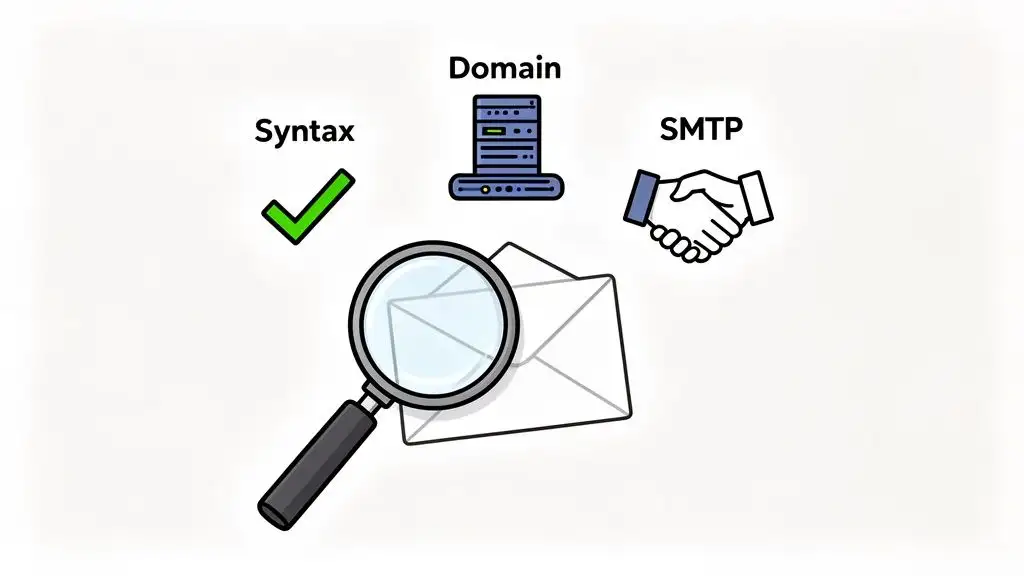
Think of email verification as a three-part handshake. First, you check if the email address is even formatted correctly (the syntax). Next, you see if the domain exists and is set up to receive mail (the MX record check). Finally, you discreetly ask the recipient's server if that specific user is home (the SMTP handshake).
Getting this process right is the difference between your message landing in the inbox and getting returned to sender. This is crucial for protecting your sender reputation and actually getting your emails read.
Why Bounced Emails Are Quietly Sabotaging Your Sales
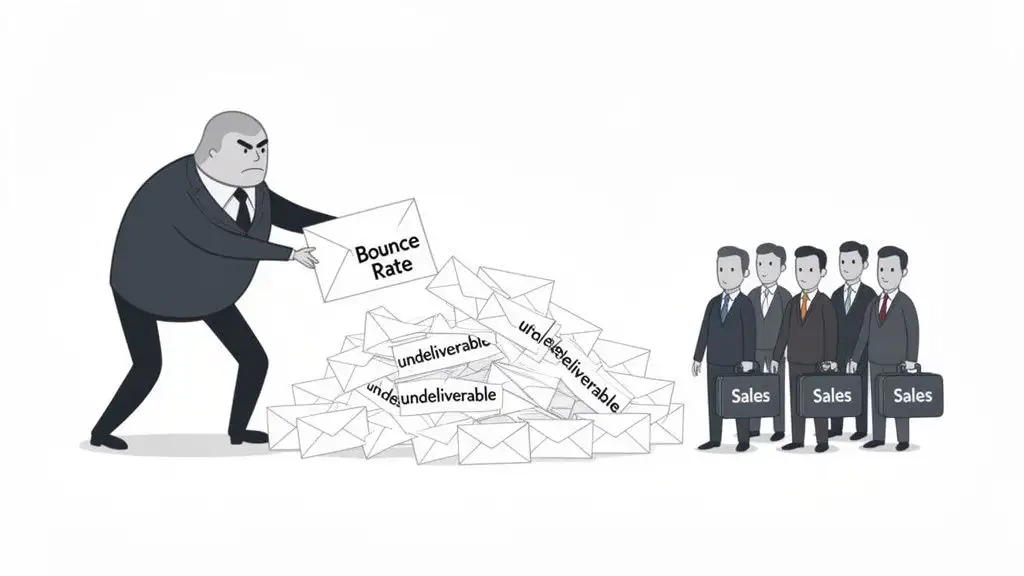
Before we get into the nitty-gritty of verification, let's talk about why you should even care. Firing off an email to a bad address isn’t just a wasted click. It's a black mark against your name. Every time an email bounces back, it’s a tiny red flag waved directly at the internet’s gatekeepers: email service providers (ESPs) like Google and Microsoft.
Think of these providers as the digital bouncers of the inbox. Their number one job is to keep spam out. When your emails consistently bounce, you start looking less like a legitimate business and more like a spammer who bought a list from 2009. It’s the fastest way to get your domain’s reputation dragged through the mud.
The Real Cost of a Bad Sender Reputation
Once your sender reputation takes a dive, the consequences snowball fast. It’s not just the bad emails that stop getting through; your legitimate, carefully written messages to high-value prospects start getting rerouted straight to the junk folder. You basically become that person whose calls always go to voicemail.
Your sender reputation is your email credit score. A high bounce rate is like missing a bunch of payments. It tanks your score, and suddenly no one wants to do business with you.
This hits your bottom line, hard. Every email that lands in spam is a lost opportunity, a missed connection, and a potential deal that never even got off the ground. For a deeper dive into the mechanics, check out our guide on what is a bounced email.
How a "Small" Bounce Rate Cripples Your Outreach
You might think a 5% or 6% bounce rate is no big deal, but in the world of email deliverability, it’s a five-alarm fire. Most ESPs have incredibly strict thresholds for what they consider acceptable. Cross that line, and they'll start throttling your campaigns or even suspend your account. It’s their way of saying, "Clean up your list, or you can’t play here anymore."
Industry benchmarks are pretty unforgiving. For instance, when hard bounces creep past just 2%, many ESPs start to ding a sender's reputation. Hit 5% or more, and some providers will automatically suspend or severely limit your campaigns.
Let's make it real. For a sales team sending 20,000 emails a month, improving from a 6% to a 1% bounce rate by verifying addresses means you stop 1,000 failed deliveries every single month. That one step dramatically improves inbox placement and protects the long-term health of your entire sales pipeline. The email verification software market is growing for this very reason.
Ultimately, email verification isn't some boring technical task to hand off to IT. It’s a core part of any winning sales strategy. It ensures your message gets seen by the right people, protects your most valuable asset (your domain), and keeps your sales engine firing on all cylinders.
The Secret Life of an Email Verification Check
Ever wondered what actually happens when you click 'verify'? It’s not some dark magic. It's more like a high-speed background check, a tiny digital PI running down a lead in milliseconds.
This process sorts the good contacts from the digital ghosts before you ever hit "send." Think of it as 'CSI: Email Land,' where every address is a suspect until proven valid.
Let’s crack open the case file and see what’s really going on under the hood.
The First Filter: Syntax and Formatting Checks
The very first thing any verification tool does is the simplest: the syntax check. This is the grammar cop of the email world. It doesn't know if "jane.doe" actually works at the company, but it knows what a real email address is supposed to look like.
It's a simple pattern-recognition game, checking for the basic, non-negotiable parts of an email address.
-
The "@" Symbol: Is there one, and only one? An address like "jane.doecompany.com" is an immediate fail.
-
A Valid Domain: Does it have a proper ending, like
.com,.org, or.io? Something like "contact@salesforce" is missing its top-level domain and gets tossed. -
No Illegal Characters: Are there weird symbols or, heaven forbid, spaces? An address like "john doe@example.com" is a classic data entry fumble that gets flagged instantly.
This is your first line of defense, catching the most obvious typos and goofs. It's the bouncer at the door, turning away anyone not dressed for the party.
The Second Hurdle: Domain and MX Record Validation
Once an address passes the eyeball test, the investigation gets more serious. The next move is to confirm that the domain itself is real and, more importantly, that it's actually set up to receive email. This is the MX (Mail Exchanger) record check.
Think of the domain (company.com) as a building's street address. The MX record is the specific instruction telling the mail carrier which door to use for deliveries. If that instruction doesn't exist, the email has nowhere to go.
This check answers one critical question: "Does this company's server even have a mailbox?" If the answer is no, it doesn’t matter if the person's name is right; the email is going nowhere.
This step is huge for accuracy. It weeds out emails tied to defunct companies or flat-out fake domains, confirming a legitimate destination actually exists.
The Main Event: The SMTP Handshake
This is where the real detective work happens. The SMTP (Simple Mail Transfer Protocol) handshake is a polite, technical conversation between your verification tool and the recipient's email server. It basically pretends to send an email without actually sending one.
The conversation goes something like this:
-
Verifier: "Hello,
mail.company.comserver, I have a message forjane.doe@company.com." -
Recipient's Server: It quickly checks its user directory.
-
Recipient's Server Responds: It will either say, "Yep, that user is here, go ahead," or "Sorry, no user by that name here."
If the server confirms the user exists, the verifier knows the address is legit and immediately hangs up the call. No email is sent, but the address is confirmed. Once you know your data is valid, you can make it even more powerful. Learning about the process of data enrichment shows you how to add valuable context to your verified contacts.
Email Verification Checks at a Glance
To make it even clearer, here's a quick breakdown of what each layer of the investigation accomplishes.
| Verification Step | Its Purpose | Example of What It Catches |
|---|---|---|
| Syntax Check | Basic formatting and grammar | john.doe@company (missing .com) |
| Domain/MX Check | Confirms the domain exists and can receive mail | jane.doe@nonexistentcompany.com |
| SMTP Handshake | Pings the server to see if the specific user exists | fake.employee@realcompany.com |
| Advanced Detection | Identifies risky or temporary email types | user123@10minutemail.com (disposable) |
Each step peels back another layer, giving you a clearer picture of whether your email will actually land in a real person's inbox.
Advanced Sleuthing: Disposable and Accept-All Domains
Modern verification goes even deeper, sniffing out the sneakiest email traps that can still hurt your sender score.
The first culprit is the disposable email address. These are temporary inboxes from services like Mailinator or 10 Minute Mail, created just to get past a sign-up form. They’re the email equivalent of a burner phone and are almost always a waste of your time.
The other tricky character is the accept-all (or catch-all) domain. These servers are configured to lie. They tell every verification tool that every single address at their domain is valid, even if it’s batman@company.com. While it sounds clever, it's a defense mechanism against spam, and sending to a non-existent address on one of these servers can still result in a hard bounce.
A top-tier verification service will flag both disposable and accept-all domains, giving you the intel you need to decide if they're worth the risk.
Choosing Your Verification Tool
Alright, so you’re ready to stop screaming into the digital void and actually get your emails delivered. Smart move. But picking the right way to verify those emails is a bit like choosing a character in Street Fighter II. Do you go with the slow manual checks, or with fast automated APIs?
The right choice depends entirely on the fight you’re in. Your options range from painstakingly inspecting each email one-by-one to unleashing fully automated systems that do the dirty work for you. Let's break down the main contenders.
The Artisanal, Hand-Crafted Verification Method
First up is the manual spot-check. This is your go-to when you absolutely, positively have to make sure an email to a VIP prospect is going to land. Think of it as the "Is this thing on?" microphone tap before you walk on stage for a big presentation.
You'd typically use a free, single-email verifier tool or a simple browser extension to check one address at a time. It’s perfect for:
-
Double-checking a CEO’s email before you hit send on that massive proposal.
-
Verifying a handful of key contacts you just scribbled down on a napkin at a conference.
-
Confirming a lead from a high-value inbound form before passing it to your top salesperson.
It’s precise, it’s usually free, and it’s a lifesaver for those few critical emails. But if you try to verify a list of 1,000 contacts this way, you'll quickly find yourself in a special kind of data-entry hell. It's like trying to binge-watch all of The Office in one sitting. It's theoretically possible, but you'll probably lose your mind somewhere around season six.
The big takeaway here is that manual verification is a scalpel, not a sword. Use it for surgical precision on high-value targets, but don’t bring it to a large-scale data battle.
For any team serious about outbound sales, relying solely on manual checks is like showing up to a laser fight with a slingshot. You need bigger, more automated firepower.
The Big Guns: Automated Tools and APIs
When you're dealing with hundreds or thousands of contacts, it's time to call in the automated cavalry. These tools are built for one thing: processing massive lists with speed and scale, then spitting out detailed reports on what’s good, what’s bad, and what’s just plain weird.
And this isn't some niche corner of the internet. For instance, some reports value the bulk email verification market at around USD 1.2 billion in 2024 and project it to skyrocket to USD 4.06 billion by 2033. There's a good reason for that growth. In many B2B companies, email still drives 20–40% of the outbound-sourced pipeline. Even a tiny bump in deliverability can translate into hundreds of thousands in new revenue.
There are two main flavors of automated solutions to consider.
-
Bulk Verifiers: This is your classic drag-and-drop solution. You upload a CSV file of your contacts, and the platform scrubs the entire list at once. It’s the perfect tool for a "spring cleaning" of your existing database or for vetting a new list you’ve just acquired before it pollutes your CRM.
-
Integrated Platforms & APIs: This is the more sophisticated, real-time approach. Instead of cleaning lists after you have them, verification is woven directly into your workflow from the get-go. For example, a platform like Munch verifies contact information the moment it’s found, ensuring your team only works with clean, validated data from the start.
So, which one is for you? If you get your lists in big, infrequent batches, a bulk verifier might be all you need. But if your sales team is constantly sourcing new leads, an integrated solution that validates in real time is the only way to keep your data pristine and your outreach effective.
Ultimately, this ensures you’re not just sending emails, but starting valuable conversations. And to make those conversations count, you'll need the right outreach tools.
Let's Build Your Email Verification Workflow
Alright, enough with the theory. It's time to get our hands dirty and move from what email verification is to how you actually make it work for you. Building a solid workflow isn't about buying one magic tool; it's about engineering a system. A well-oiled machine that takes raw prospect signals and spits out clean, ready-to-use contact data without you lifting a finger.
Think of it like being a DJ. You don't just throw every song you own into a single playlist and hit play. You start with a vibe (identifying prospects), find the perfect tracks (enriching the data), check the sound quality of each one (verification), and then mix them into a set that gets people moving (your outreach). A verification workflow does the exact same thing for your sales pipeline.
Here’s a simple way to visualize how your verification strategy should evolve as you scale, from one-off checks to a fully integrated system.
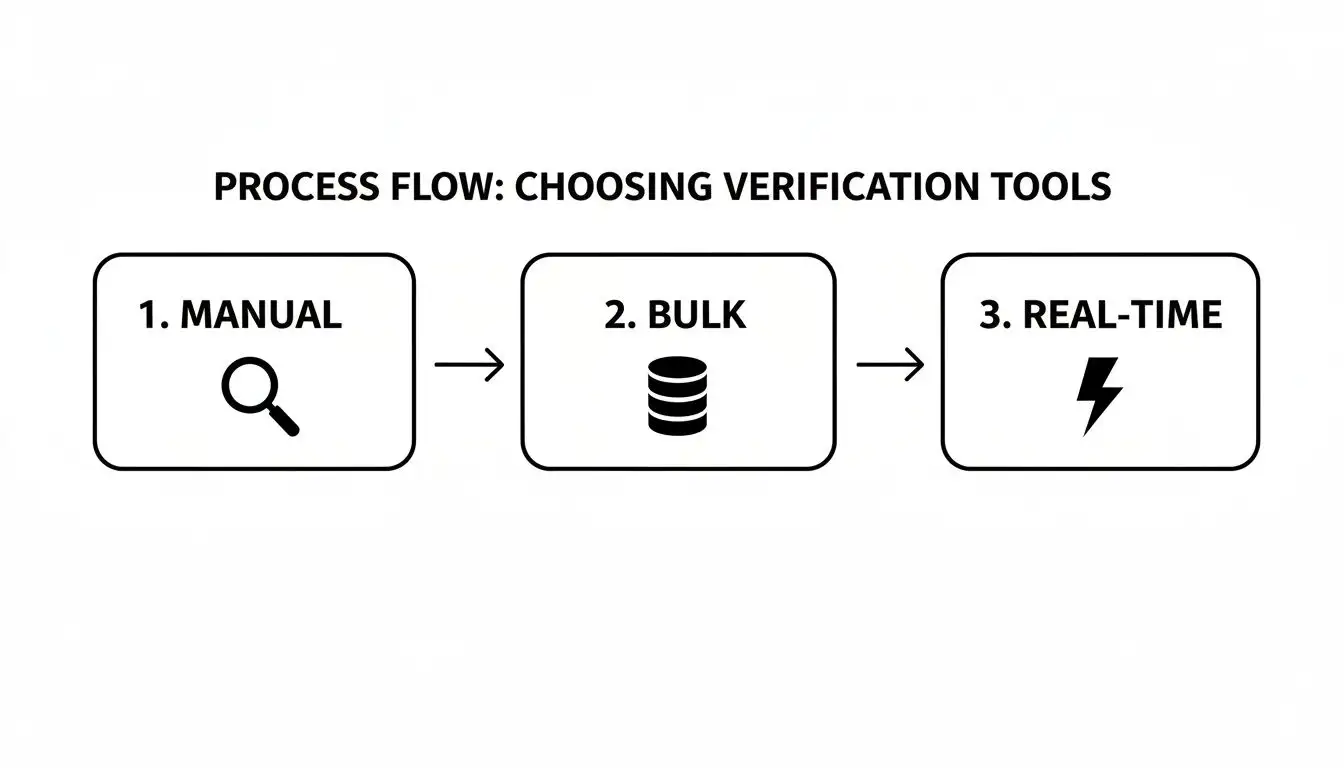
This flow shows how you level up from manual spot-checks to the kind of real-time, automated verification that powers a modern sales team.
Start with High-Intent Buying Signals
Newsflash: your workflow doesn't start with an email address. It starts with a buying signal. This is any real-world event that screams, "Hey, this person or company might need our solution right now." Ditch the cold, stale lists and start reacting to what's happening in the market.
These signals are the breadcrumbs that lead straight to your next customer. For example:
-
Job Changes: A new VP of Sales just landed at a target account. You can bet they're looking to make a splash in their first 90 days.
-
Funding Announcements: A company just closed a Series B round. That means they have fresh cash and a mandate to grow, a perfect time to reach out.
-
New Tech Adoption: A prospect just implemented a tool that integrates perfectly with yours. That's not a cold lead; that's a warm introduction waiting to happen.
Keeping your ear to the ground for these signals is the absolute first step. This is where you find your A-list prospects before you even think about hunting down their contact info. For a deeper dive, check out our guide on how to find business emails for your ideal customers.
Automate Your Enrichment and Verification Stack
Okay, so you've got a list of people and companies showing strong intent. Now, the fun begins. It's time to connect your tools and build an automated data assembly line that eliminates the soul-crushing "copy-paste" drudgery that kills sales productivity.
The whole point is to go from signal to verified contact in seconds, not hours. A modern tech stack for this might look something like this:
-
Signal Source: Your platform (like Munch) spots a buying signal, let's say that new CMO hire at a dream account.
-
Enrichment Engine: That signal automatically triggers a data enrichment tool. In a flash, the tool scours the web to find the new CMO's likely email address and LinkedIn profile.
-
Instant Verification: The second an email is found, it’s zapped over to a verification API. This isn't some batch process you run on a Friday afternoon; it happens in real-time, for every single contact.
This instant feedback loop is the heart of an efficient workflow. You're not just collecting data; you're qualifying its usefulness on the fly.
Pro Tip: You can use a single platform like Munch to build your prospect lists, enrich their data and even craft personalized outreach messages and sequences and save countless hours.
Segment and Act on the Results
A good verification tool doesn't just give you a simple "yes" or "no." It gives you a specific status for each email, and your workflow needs to know exactly what to do with each one. This is where you get smart and turn that data into a real strategic advantage.
Let's break down the common results and what your automated action plan should be.
-
Valid: Green light! These contacts are good to go. The workflow should automatically push them into your main outreach sequence in your sales engagement tool. No need for a manual review. Just hit 'em up.
-
Risky / Accept-All: This is your yellow light. Don't toss these contacts out, but don't treat them like a guaranteed delivery either. Have your workflow flag them in your CRM for a quick once-over or, even better, route them to a non-email-first sequence. A LinkedIn connection request is a great first move here.
-
Invalid / Disposable: Dead end. Red light. Stop. Your workflow should automatically purge these from your active lists or mark them as "Do Not Contact." Sending to these addresses is like intentionally driving into a brick wall. It only hurts your sender reputation.
The impact of this automated sorting is huge. Some estimates show that 30–40% of high-intent leads sourced each quarter aren't properly verified, meaning a massive chunk of your potential pipeline simply vanishes.
By integrating enrichment and verification, you close that gap and can achieve 95%+ email accuracy. In a competitive market, that level of precision is the difference between a clogged, useless database and a clean, high-performing sales engine.
This structured approach makes sure your best emails get to your best contacts, your iffy emails are handled with care, and your bad data never gets a chance to sabotage your efforts. It’s the blueprint for an outbound machine that practically runs itself.
Common Verification Mistakes to Avoid
Even with the best tools, it's surprisingly easy to fumble the ball on the one-yard line. Knowing how to verify email addresses is one thing, but sidestepping the common face-palm moments is what separates the pros from the rookies. It’s less like dodging a wrench and more like not stepping on the same rake over and over again.
Think of this as your field guide for navigating the gray areas. Avoiding these classic blunders will help protect your sender reputation and keep your sales engine humming smoothly.
Chasing the Myth of a 100% Verified List
Let's get this out of the way first: a perfectly clean, 100% verified list is a unicorn. It simply doesn't exist. Aiming for it is like trying to find a version of Friends where Ross isn't insufferable. It's a noble but ultimately futile quest.
B2B data decays at a blistering pace. People change jobs, companies get acquired, and email servers change their policies without sending you a memo. Striving for absolute perfection leads to analysis paralysis, where you spend more time scrubbing your list than actually reaching out to prospects.
The goal isn't a flawless list; it's a resilient process. Focus on consistently removing invalid addresses and intelligently handling the uncertain ones. A list that is 95% accurate and actively managed is far more valuable than a mythical "perfect" list that never gets used.
A healthy list has a small, manageable margin of uncertainty. You just have to embrace it, manage it, and move on.
Blindly Trusting a Single Data Source
Putting all your faith in one verification tool or data provider is a classic rookie mistake. No single source has a monopoly on the truth. Some are better at identifying role-based addresses, while others excel at sniffing out accept-all domains.
Relying on just one is like getting all your news from a single, highly biased source. You're only getting part of the picture. This is where a waterfall enrichment process becomes so valuable, cross-referencing multiple providers to get the most accurate result possible. Munch does waterfall enrichment by default.
Fearing the "Risky" and "Accept-All" Emails
One of the biggest trip-ups is how teams handle emails that aren't clean "valid" or "invalid" results. The "risky" and "accept-all" categories can feel like a gray area, causing many to simply discard them. This is a huge mistake.
These aren't dead ends; they're just detours. Here’s a simple framework for making the call:
-
Is the prospect high-value? If it's a key decision-maker at a dream account, a "risky" status shouldn't stop you. The potential reward is worth the minimal risk.
-
What's your risk tolerance? If you have a pristine sender reputation, you can afford to test a small segment of "accept-all" emails. If your reputation is already shaky, it's better to play it safe.
-
Can you use another channel? For these contacts, lead with a LinkedIn connection request instead of an email. It's a no-risk way to open the door and potentially confirm their contact details later.
Treating these emails with a little extra care instead of deleting them can save some of your best opportunities from being prematurely abandoned.
Ignoring the Impact on Your Sender Reputation
Finally, the most dangerous mistake is treating verification as a one-and-done task instead of an ongoing strategy to protect your domain. Every hard bounce chips away at your sender reputation. A few bad sends are forgivable, but consistently ignoring verification is like repeatedly speeding in a school zone. Eventually, you’re going to get penalized.
This directly impacts your ability to land in the inbox. For a more detailed breakdown of this crucial metric, you should learn more about how to improve email deliverability and protect your domain for the long haul. A healthy sender reputation is the foundation of all successful outbound campaigns.
Got Questions? We've Got Answers.
Alright, let's tackle some of the most common head-scratchers that pop up when people start getting serious about email verification. Think of this as the rapid-fire round where we clear up the confusion and get you back in the game.
How Often Should I Really Be Verifying My Email List?
For anyone doing active sales outreach, the answer is simple: constantly. Seriously. The gold standard is to verify an email right before it enters your outbound sequence. B2B contact data goes stale faster than a loaf of bread in the desert. People get promoted, switch departments, or jump to a new company all the time.
Now, if you're working with a more static list, like a newsletter audience, you can relax a little. A thorough cleaning at least once a quarter is a good rule of thumb. Waiting until you see your bounce rate spike is like waiting for your car to overheat before checking the coolant. A little proactive maintenance goes a long way in protecting your sender reputation and keeping those delivery rates sky-high.
What's the Real Difference Between a Hard Bounce and a Soft Bounce?
This is a classic, so let's nail it down. Imagine you're mailing a package.
A hard bounce is a permanent, dead-end failure. It's the post office stamping "Return to Sender: Address Unknown" on your box. This means the email address is flat-out wrong, has a typo, or the domain simply doesn't exist anymore. Hard bounces are pure poison for your sender score, and you need to purge them from your list immediately. No second chances.
A soft bounce is more like a temporary hiccup. The delivery driver showed up, but couldn't complete the drop-off because the recipient's mailbox was stuffed to the gills, or maybe their company's mail server was down for a quick nap. Most email service providers will try to send it again a few times. Think of soft bounces as a yellow flag, while hard bounces are the big, loud, "STOP NOW" red flag.
Are Those Free Email Checkers Actually Any Good?
Look, for a one-off check to see if your cousin's weird email address is real? Sure, knock yourself out. But for a sales team whose success depends on landing in the inbox? Absolutely not. Relying on free tools for mission-critical outreach is like trying to build a house with a plastic toy hammer. You're just asking for trouble.
Here’s why free tools usually fall short:
-
Shaky Accuracy: They often struggle with the trickier stuff, like spotting catch-all domains, and their data can be painfully out of date.
-
Vague Results: You’ll often get a simple "valid" or "invalid," missing the crucial "risky" category that helps you make smart decisions.
-
Tiny Usage Limits: Most will cut you off after just a handful of checks, making them completely impractical for cleaning a real list.
Investing in a professional-grade verification service isn't an expense; it's insurance for your domain reputation and your sales pipeline. The cost is a drop in the bucket compared to the value of getting your message in front of the right person.
I Keep Seeing "Accept-All" or "Catch-All." What Does That Even Mean?
An "accept-all" or "catch-all" server is the corporate equivalent of a brick wall that says "Welcome!" The company configures its mail server to accept any email sent to its domain, even if it's batman@your-dream-client.com. They do this to prevent spammers from figuring out their employee email patterns, but it creates a massive headache for legitimate outreach.
The real danger with accept-all domains is the delayed bounce. The server initially accepts your email, giving you a false sense of security, only to send a hard bounce notification back to you minutes or hours later.
The smart move is to treat these emails with extreme caution. Segment them into a separate campaign, maybe run from a secondary domain to shield your primary one from a potential bounce-rate disaster. Even better, take it as a cue to switch channels. A well-worded LinkedIn message is a much safer bet than knowingly walking into an email trap.
Ready to stop guessing and start connecting with the right people? Munch integrates real-time, 95%+ accurate email verification directly into your prospecting workflow, so you only engage with valid contacts. Find high-intent prospects and reach them with confidence. Start building your pipeline with Munch today.