How to Find Business Emails Without Losing Your Mind

By Mriganka Bhuyan
•Founder at Munch
Trying to track down a business email can feel like you're playing detective, but it's the first step to a real conversation. Most people are bad at it. This guide is about what actually works, starting with methods you can use right now.
Why Finding Emails the Right Way Matters
Getting a direct email isn't just a box-ticking exercise for your prospect list. It opens a clean, direct line to a real person. Let's be honest: social media DMs are a mess, and cold calls get screened into oblivion. An email lands right where professionals expect to do business.
This isn’t a guide on scraping a huge list to blast a generic pitch. That’s a one-way ticket to getting your domain blacklisted. The real goal is finding the right email for a specific, relevant conversation. A targeted email shows you’ve done your homework and value their time.
The High Cost of Bad Data
Working with inaccurate or old emails will wreck your outreach. High bounce rates from dead addresses tank your sender reputation. Email providers like Gmail and Outlook are smart; they see this and start throwing your messages straight into spam, meaning even your good emails never get seen.
This is about more than dodging the spam folder. It’s about building a system that gets your outreach in front of people who can say "yes." That's the foundation of any sales or marketing effort.
A Sharper Strategy for Reaching Out
The methods we're about to cover are about precision, not spraying and praying. A carefully researched list of 50 key contacts will always outperform a scraped list of 5,000. It's the difference between being a welcomed expert and just another annoying distraction.
When you focus on quality, you also improve your lead qualification. For a deeper look at that, see our guide on lead scoring best practices.
This is important because email is still the king of professional communication. By 2025, an estimated 376.4 billion emails will be sent every day. With 86% of professionals preferring email for business, according to email marketing statistics on Omnisend.com, getting the address right is your first, non-negotiable step.
Mastering the Manual Search
Before you spend money on a tool, you should learn the manual methods. They're free, effective, and build a skill that will always serve you. Think of it less as a chore and more like becoming a digital detective spotting clues everyone else misses.
Your first move? An educated guess. It sounds basic, but most companies use a standard email format. They aren't trying to be clever; they just need a system that works.
This process is about testing common patterns until one sticks.
Decoding Corporate Email Patterns
Let's start with the basics. If you know your prospect's name (say, Jane Doe) and their company (Acme Corp), you can start trying the most common email structures.
-
j.doe@acme.com -
jane.doe@acme.com -
janed@acme.com -
jdoe@acme.com -
jane@acme.com
It’s a simple process of elimination. Once you find a working email for one person at the company, you've likely cracked the code for everyone else there.
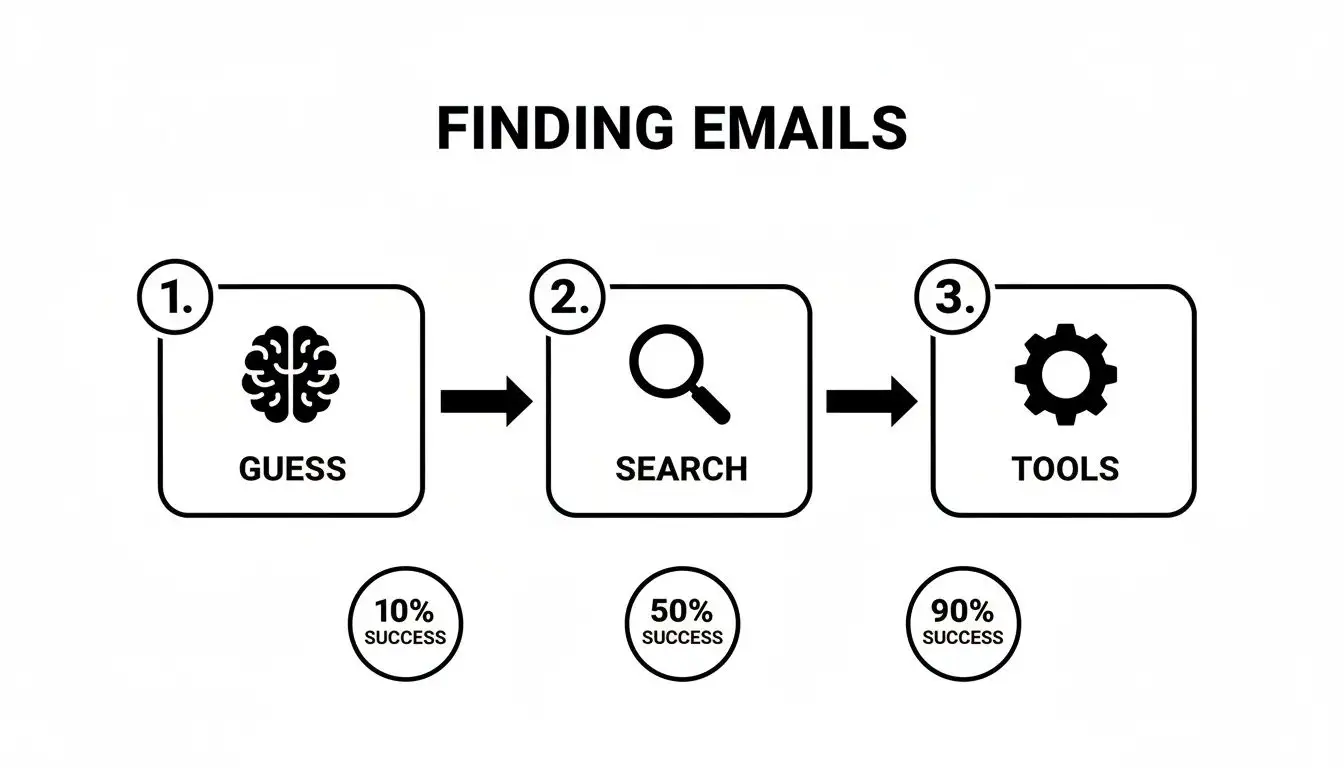
As you can see, just guessing won't get you far. But when you add some smart searching, your odds get much better.
Using Google Search Operators
When guessing fails, it's time to use Google's advanced search operators. These are simple commands that filter Google's results to pinpoint what you're looking for. It's like telling the search engine, "Don't just search, search like this."
A powerful combo for our purposes is: "[First Name] [Last Name]" + "company name" + email
This tells Google to find pages containing the person's exact name, their company, and the word "email." You’d be surprised what this uncovers: forgotten press releases, old conference speaker bios, or staff directories with the exact contact info you need.
This one trick often unearths public emails that are just buried a few pages deep in the search results. It’s the digital equivalent of looking under the couch cushions.
LinkedIn Is Your Best Friend
LinkedIn is more than a place to get spammed by recruiters; it’s a goldmine for email clues. People often leave breadcrumbs that lead directly to their contact information.
Start by digging into their profile. Check the contact info section, but also look at their recent activity. Sometimes, a person’s posts or comments will link to their personal blog or a company resource where their email is listed.
Don’t forget the company's "About" section on their main LinkedIn page, either. It can reveal the standard email format for the organization. These manual research skills are a core part of effective outreach, and you can learn more about building on them in our guide to sales prospecting best practices. Combine these techniques, and you'll be finding business emails like a pro.
Which Email Finder Tool Should You Actually Use?
Manual searching is a great skill to have. But it doesn't scale. When you have a list of 50, 100, or 500 prospects, finding each email by hand is a one-way ticket to burnout. That’s where tools come in.
The problem? The market is flooded with them, and they are not all created equal.
Your goal isn't just to get an email. It's to find the right person's verified, deliverable email. A bad tool will spit out garbage data, tanking your sender reputation and wasting your time. The right one feels like an extension of your brain.
The Quick-Draw: Browser Extensions
First up are browser extensions. These live in your Chrome or Firefox toolbar and are built for speed. You find a prospect on LinkedIn, click the extension's icon, and it pulls up their email address from its database.
They're perfect for one-off searches while you're actively hunting for leads. The trade-off is they're useless for lists. If you've got a spreadsheet with 200 names, clicking through each profile individually will give you carpal tunnel.
A great browser extension feels like a secret weapon. You spot the perfect prospect on their LinkedIn page, and seconds later, you have a direct line to them. This is the dream for any SDR who basically lives on LinkedIn.
The Heavy Lifters: Bulk Finders and Enrichment Platforms
When it's time to go big, you need a bulk email finder or a data enrichment platform. These are the workhorses. You feed them a CSV file of names and company domains, and they give you back a spreadsheet filled with verified email addresses.
This is how you build serious campaigns. Instead of pecking away one contact at a time, you process entire lists. The best platforms, like Munch, don't just stop at emails. They enrich your data with job titles, company size, funding rounds, and the tech stack a company uses. That extra intel is what turns a generic cold email into a relevant conversation, which is the foundation of successful outbound lead generation.
How to Choose Your Weapon
Picking the right tool boils down to your workflow. There's no single "best" tool, just the one that's the best fit for your budget, process, and the size of your lists.
Here’s a quick comparison of the different tool types.
Email Finder Tool Comparison
| Tool Type | Primary Use Case | Typical Cost | Accuracy Level |
|---|---|---|---|
| Browser Extension | On-the-fly prospecting on LinkedIn & company websites. | Low (often freemium with credit packs) | Variable, check reviews. |
| Bulk Email Finder | Processing CSV lists of a few hundred to a thousand leads. | Mid-range (monthly subscription or per-list pricing) | Generally high, but verification is key. |
| Enrichment Platform | Scaling large lead lists with emails and other data points. | Higher (subscription-based, tiered pricing) | Very high, often with guarantees. |
The tool you choose should make your life easier, not more complicated.
Here’s a practical checklist for vetting options:
-
Accuracy is Everything: Don't consider a tool that can't promise 95% deliverability on its verified emails. A high bounce rate will get you flagged by email providers. Ask if they offer credits back for bounced emails.
-
Plays Well with Others: Does it integrate with your CRM (like Salesforce or HubSpot) or your sales engagement platform? A good integration saves you from manual data entry.
-
Where's the Data From?: Ask how they source their information. Reputable providers will be transparent, using a mix of public records, data partnerships, and their own verification tech. If they're sketchy about their sources, run.
-
Cost vs. Real Value: It's tempting to go for the cheapest option. That's a rookie mistake. Focus on the cost per verified lead, not just the cost per credit. A cheap, inaccurate tool will cost you more in the long run.
Don't Skip This Step: Verifying Your Emails
So you found it. You have an email address in your spreadsheet. Before you hit "send," how do you know it's real?
Sending an email to a dead address is a self-inflicted wound. Every time an email bounces, it sends a distress signal to services like Gmail and Outlook. Get too many of those, and they start thinking you're a spammer. Suddenly, all your messages land in the junk folder. Your sender reputation takes a nosedive, and it’s a tough climb back up.
You wouldn't make a call without first checking if the phone number is active. This is the same principle. Verifying an email protects your domain and makes sure your work pays off.
It's More Than a Syntax Check
Real email verification goes beyond making sure the address looks right (name@company.com). A proper verification process is a multi-point inspection to confirm a mailbox is active.
Here’s what happens when you use a verification tool:
-
Syntax & Formatting: The first, basic check. It catches obvious typos.
-
Domain & Server Check: It confirms the domain (
company.com) is legit and has mail servers set up to receive messages. -
The Mailbox Ping: This is the key part. The service sends a tiny signal to the server without actually delivering an email and asks, "Hey, is there a
jane.doehere?" The server's response tells you if the mailbox exists.
This process weeds out fakes, typos, and tricky "catch-all" addresses that accept everything but often lead to bounces. You can learn more about what a bounced email means for your sender reputation right here.
The Right Tools for the Job
You don't have to do this by hand. If you just need to check one or two emails, a search for a "free email verifier" will give you plenty of options for a quick spot-check.
Once you’re dealing with more than a handful of contacts, those free tools won't cut it. It’s time to graduate to a real verification service. This is a must for any serious outreach campaign.
When you have a list, you can just use Munch. That's right! You can use the same platform to find email addresses and verify those email addresses. Isn't that convenient!
A quality tool should get you to a deliverability score of 95% or higher. Spending a few bucks to clean your list is a small investment compared to the headache of a trashed sender reputation. It’s the business equivalent of looking both ways before crossing the street.
Don’t Get Yourself in Hot Water: Staying Compliant and Ethical
So, you've found an email address. That doesn't give you a green light to start blasting messages. The rules around commercial email are serious business with fines that could make your eyes water.
Navigating this world can feel like trying to decipher an app's terms and conditions: dense, a little boring, but critical.
My goal isn't to scare you with legal jargon. It's to give you the plain-English rundown so your outreach starts a conversation, not a legal battle. Think of this as the "don't be that person" guide to B2B emailing.
CAN-SPAM and GDPR: The Unskippable Boss Levels
You have two major rulebooks to know: CAN-SPAM in the US and GDPR in the EU. They have differences, but the core idea is the same: be honest, be clear, and give people an easy way out. Getting this wrong is expensive; a single CAN-SPAM violation can cost you over $50,000. Ouch.
For those of us in the U.S., the CAN-SPAM Act is fairly straightforward. It applies to all commercial messages, including your B2B emails. The big takeaways are:
-
No Sneaky Business: Your "From" name, reply-to address, and subject line have to be accurate. Don't pretend you're their long-lost cousin or Elon Musk. This isn't Catfish.
-
Call It What It Is: You need to clearly identify the email as an advertisement.
-
Show Your Location: A valid physical postal address has to be in there. A P.O. box works.
-
Offer an Escape Hatch: Give people a clear and easy way to unsubscribe. You have 10 business days to honor that request.
GDPR, which protects the data privacy of everyone in the EU, is much stricter. It often requires explicit consent or a well-documented "legitimate interest" to even contact someone.
Here's a peek at the official GDPR info page, which lays out the key principles for handling data.
The screenshot hammers home concepts like lawfulness, fairness, and transparency. These aren't just buzzwords; they should be the foundation of your outreach.
Beyond the Law: The Simple Ethics of Outreach
Compliance is the absolute minimum. The real art is crafting outreach that people don't immediately hate. Just because it's legal to find a business email and send a cold message doesn't mean you should treat it like a numbers game.
The goal is to be a welcome guest in someone's inbox, not a home invader. Every email you send should be relevant, respectful, and valuable to the person on the other end. If it isn't, you're just more noise.
This comes down to doing your homework. Personalize your message based on their role, something their company just did, or a shared connection. Show them you're a real human who put in a minute of effort.
For a masterclass on this, check out our deep dive on cold email best practices. It's all about making your outreach thoughtful, human, and effective.
Got Questions? We've Got Answers
You have the playbook, but a few questions always come up when you're in the trenches. Let's tackle the big ones.
So, Is It Actually Legal to Email Someone I Found This Way?
In the B2B world, the short answer is usually yes, but you can’t just go wild. Laws like CAN-SPAM in the US and GDPR in Europe are the sheriffs in town.
For most business-to-business outreach, you’re covered under "legitimate interest," which means your offer should be relevant to their job. Are you selling marketing software to a Head of Marketing? You're probably in the clear. Pitching them a new set of golf clubs? Not so much.
Just remember the golden rules:
-
Give them an easy out. A clear, one-click unsubscribe link is a must.
-
No fake identities. Be upfront about who you are and what company you represent.
-
Don't be tricky. Misleading subject lines are a fast track to the spam folder and legal trouble.
And a word of caution: scraping purely personal emails from social media is a major foul. Stick to professional relevance and always respect their right to tell you to get lost.
What’s a “Good” Accuracy Rate for an Email Finder Tool, Anyway?
Anyone promising you a 100% accurate list is selling you snake oil. It’s not possible. People change jobs, companies get acquired, and email systems get overhauled. Data is always in flux.
A top-tier tool should hit a 90-98% accuracy rate for emails it flags as deliverable. Anything less, and you're wasting your time. A healthy bounce rate for your campaigns should be under 5%. If you’re seeing higher numbers, it’s a red flag that you’re damaging your sender reputation.
My advice? Always use a tool that has real-time verification built-in, or run your final list through a separate verifier before you hit "send." It's a small step that saves you from a world of hurt.
How Do I Find Emails for an Entire Team or Department?
Ah, the holy grail. This is where you put on your detective hat. It's less about finding a magic list and more about cracking the company's code.
First, hop on LinkedIn and find a few key people in the department you're targeting. Use the manual tricks we talked about earlier to find the email address for one or two of them. Once you have a couple of confirmed emails—say, jane.doe@company.com and john.smith@company.com—you’ve found the pattern.
You've cracked the code. Now you just apply that same formula (
firstname.lastname@company.com) to the other names on your list. It's like finding a master key that unlocks every door on that floor.
Doing this manually for one company is one thing. But if you need to scale this across dozens of accounts, a bulk enrichment tool (like Munch) is the only way to stay sane. It does all that pattern-finding and verification automatically, saving you from a spreadsheet nightmare and helping you find business emails at a scale that grows your business.
Ready to stop guessing and start connecting? Munch pulls together lead discovery, data enrichment, and AI-powered personalization into a single platform, delivering verified emails with over 95% accuracy. Find your next customer with Munch.