A Modern Playbook For Prospecting With LinkedIn

By Mriganka Bhuyan
•Founder at Munch
If you're in B2B sales, LinkedIn isn't just a tool in your belt. It’s the entire workshop. Prospecting here means more than just blindly sending connection requests; it's a craft. It's about turning your profile into a magnet for your ideal buyers, strategically building lists of high-value targets, and kicking off real conversations that actually lead somewhere. For any modern sales team, this is the main game.
Why LinkedIn Is The B2B Prospecting Super Bowl
Get this straight: prospecting on LinkedIn isn't just another item on your daily checklist. It's the main event. It's the championship round where deals are won.
Other platforms are for baby pictures and arguing about pineapple on pizza. LinkedIn is the only place built from the ground up for professionals. Think about it: where else can you find CEOs, VPs, and key decision-makers all in one place, ready to talk business? Trying to hunt them down on Facebook or Instagram is like trying to find a working payphone. A complete waste of your time.
The Numbers Don't Lie
If you’re not convinced, let’s talk numbers. A jaw-dropping 80% of all B2B leads from social media come directly from LinkedIn. That's not a typo. It's a testament to its raw power for filling your pipeline.
And it gets better. Compared to old-school paid channels, LinkedIn is a budget-friendly beast. You can generate leads for a 28% lower cost per lead than with Google Ads, all while enjoying double the conversion rates. It’s not just about finding more people; it’s about finding the right people, faster and cheaper than anywhere else.
I've seen it time and time again. The reps who truly master their LinkedIn game consistently book more meetings. Period. Nailing your strategy here isn't just a nice-to-have; it's a direct deposit into your commission check.
Your People Are Already Here
Picture your ideal customer. Is it a Marketing Director at a SaaS startup? A CFO in manufacturing? A founder who just landed their Series A? I’d bet my quota they’re active on LinkedIn.
This platform is a goldmine of professional data, letting you get hyper-specific with your targeting. You're not just shooting in the dark. You can zero in on prospects based on things like:
-
Job Title and Seniority: Go straight to the decision-makers.
-
Company Size and Industry: Filter out the noise and focus on your sweet spot.
-
Recent Activity: Spot buying signals like job changes, company posts, or even a comment on a relevant article.
This is what separates the pros from the spammers. You can understand the context and tailor your approach so it feels personal and relevant. This whole process of digging for deeper insights is often called sales intelligence, and it's a game-changer.
LinkedIn Prospecting At a Glance
So, what does "good" actually look like? It's easy to get lost in the activity without knowing if you're on the right track. Use these benchmarks to gauge your own performance.
This table shows some standard industry averages alongside what top-tier performers are hitting. It’s your new scorecard.
| Metric | Industry Average | Top Performer Goal |
|---|---|---|
| Connection Acceptance Rate | 30%-40% | 40%+ |
| Positive Reply Rate (to first DM) | 5%-10% | 15%+ |
| Meetings Booked (per month) | ~5 | 8-10+ |
If your numbers aren't stacking up, don't panic. It’s just a signal that it’s time to tweak your targeting, rewrite your messages, or give your profile a facelift. Hitting those top-performer goals is completely within reach, and this guide will show you exactly how to do it.
Build a Profile That Actually Pulls Prospects In
Let’s be honest. Sliding into DMs with a bare-bones profile is the sales equivalent of showing up to a job interview in flip-flops. It just screams, "I don't really care." And you can bet the first thing a prospect does when they see your message is click on your face to see who you are.
It’s no surprise that reps with even a decently optimized profile perform 110% better than those who don't bother.
Think of your profile not as a dusty old resume, but as your personal sales page. It needs to do the selling for you before you ever hit "send." This is where we turn your page from a static CV into a magnet for your ideal customers.
Ditch the Job Seeker Vibe and Become a Problem Solver
Please, for the love of all things sales, ditch the corporate jargon. Nobody is impressed by "Synergizing cross-functional teams to drive paradigm shifts." It sounds like you were replaced by a badly programmed robot from a 90s sci-fi movie.
Your headline and summary need to tell a story that makes a prospect stop scrolling and think, "Huh, this person gets it."
-
Weak Headline: "Account Executive at Tech Corp"
-
Strong Headline: "I Help SaaS Founders Cut Customer Churn by 30% | Ex-Stripe"
See the magic? The first one is what you are. The second one is what you do for them. It's a mini-pitch that grabs attention right away. Your summary should then expand on this, focusing on the real-world problems you solve and the results you help people achieve. Use their language, not yours, and don't forget a clear call to action.
To make your profile even more engaging, learn how to create social media carousels from video for LinkedIn. They’re a fantastic way to break down complex ideas into bite-sized, visual stories.
Who Is Your Real Ideal Customer?
Alright, now for the most critical piece of the puzzle: defining your Ideal Customer Profile (ICP). A vague ICP like "VPs of Sales" is like saying your type is "someone who is nice." It’s a start, but it’s not going to get you very far on a crowded platform.
We have to dig deeper than basic titles and industries. The real secret is layering in buying signals, pain points, and specific triggers. This is how you stop chasing ghosts and start building lists of people who are actually ready to talk.
An effective ICP isn't just a role and an industry. It's a specific person with a specific problem at a specific time. Precision is what turns a cold shoulder into a warm introduction.
Getting this right is the key to finding high-intent prospects before your competitors even know they exist. For a deeper dive, check out our guide on how to find connections on LinkedIn with this kind of laser focus.
Building an ICP That Prints Money
Let's get practical and build one out. Here's the difference between a lazy ICP and one that actually works.
Basic ICP (The "Meh" Approach):
-
Title: VP of Marketing
-
Industry: Software
-
Company Size: 100-500 employees
Advanced ICP (The "Money" Approach):
-
Title: VP of Marketing or Head of Demand Gen
-
Industry: B2B SaaS (Fintech or Martech)
-
Company Size: 101-500 employees, Series B or C funding
-
Buying Signals: Company just announced a new funding round in the last 6 months, is actively hiring for sales roles, and has a low social media engagement rate.
-
Pain Points: Struggling to generate qualified leads for their new sales hires, wasting budget on ineffective ad campaigns, pressure from the board to show marketing ROI post-funding.
This level of detail changes the entire game. You’re no longer just another salesperson spamming inboxes. You’re a specialist who clearly understands their exact situation. Your outreach can now be surgically precise. Imagine sending a message like, "Saw you're scaling your sales team after the Series B round. Congrats! Many VPs I work with find lead gen becomes a major bottleneck at this stage..."
Now that is a message that gets a reply.
How to Build Hyper-Targeted Prospect Lists
Alright, your profile is looking sharp, and you know exactly who you're hunting for. Now for the fun part: building your hit list. Forget the old "spray and pray" method. We're going for surgical precision here. Think of it as a SEAL Team Six operation for your pipeline, not a clumsy paintball match.
We’re moving beyond the basic search bar and diving straight into the deep end with LinkedIn Sales Navigator. This is where you separate yourself from the amateurs. Most reps barely scratch the surface, but the real magic happens when you start layering advanced filters to find people practically waving a flag that says, "I have a problem you can solve!"
Go Beyond Basic Search Filters
Think of standard LinkedIn search as a rusty shovel. Sales Nav is a state-of-the-art excavator. The key isn't just finding people with the right title; it's about finding people who are actively signaling that they need you.
Instead of just typing "Director of Sales" into the search bar, let's get clever. Try combining filters like this:
-
Filter 1: "Recent Job Changes" : Set this to "Changed jobs in the last 90 days." Why? A new leader is 3x more likely to bring in new tools and vendors to make their mark.
-
Filter 2: "Posted Content About..." : Use keywords related to the pain you solve. If you sell a reporting tool, search for people posting about "sales dashboards" or "forecasting accuracy."
-
Filter 3: "Company Headcount Growth" : Zero in on companies that have grown by 10-20% in the last year. Rapid growth almost always creates new, painful operational challenges.
This combination instantly gives you a list of new sales leaders at fast-growing companies who are publicly talking about the exact problems you solve. Suddenly, your outreach isn't cold anymore. It's warm, relevant, and welcome from the very first word. You can take this even further by enriching these profiles to get a fuller picture of their tech stack and buying intent. If you're new to the concept, you can learn more about lead enrichment in our guide.
The Fine Art of the Connection Request
Okay, you've found your perfect prospect. You're ready to hit that "Connect" button. This is the moment where a staggering number of salespeople completely blow it.
They send the default, "I'd like to add you to my professional network" message. That’s the sales equivalent of a dial-up modem sound: instantly dated and incredibly annoying. Blasting out 100 generic requests a week is a one-way ticket to being ignored or, even worse, flagged as spam. The winning strategy is the complete opposite.
Prospecting success hinges on mastering connection requests. While average acceptance rates are between 30-40%, top performers who send fewer than 25 hyper-personalized requests per week often see acceptance rates over 40%. They successfully dodge the 'volume tax' that punishes high-volume senders.
Crafting a Request They Can't Ignore
Your connection note needs to be short, specific, and all about them. You have 300 characters. Don't waste a single one on a sales pitch.
Here are a few real-world examples that actually get a "yes":
-
The Shared Connection Angle: "Hi Sarah, saw we're both connected to John Doe from your time at Acme Corp. He always spoke highly of your team. Would love to connect."
-
The Content Engagement Angle: "Hi Mark, your recent post on scaling demand gen was spot on, especially your point about creative fatigue. Great insight. Would be great to connect and follow your work."
-
The Company Event Angle: "Hi Emily, noticed you spoke at the SaaStr event last month. I couldn't make it to your session on PLG but heard great things. Hope to connect."
Each of these is personalized, non-threatening, and gives a genuine reason for wanting to connect. It shows you did 30 seconds of homework, which automatically puts you in the top 1% of people sliding into their DMs. This simple, thoughtful approach is your secret weapon.
DMs That Don't Get You Immediately Blocked
Alright, your connection request got the green light. Victory! But now comes the real test: the first message. This is exactly where most people trip over their own feet, launching into a product pitch that sounds like a cheesy infomercial from 3 a.m.
You did the hard part and got your foot in the door. Don't slam it shut now by being that person at the party who only talks about themselves. The goal here isn't to sell. It's to start a real, human conversation.
Pro Tip: Use Munch AI to research all your leads and craft personalized outreach messages at scale!
The "Give, Give, Ask" Playbook
The smoothest way to slide into those DMs is with a little something I call the "Give, Give, Ask" framework. The idea is brilliant in its simplicity: you offer up genuine value twice with no strings attached before you even think about asking for a meeting. This strategy flips the script, building trust and positioning you as a helpful expert, not just another pushy salesperson.
Let's say you just connected with a new VP of Marketing. Instead of hitting them with, "Hey, got 15 minutes to see a demo of my world-changing tool?" you lead with pure, unadulterated value.
-
First "Give": Drop them a line complimenting something specific they've done. Something like: "Hey [Name], that recent campaign your team ran on [topic] was fantastic. The way you all used [specific element] was seriously smart. Just wanted to say, great work."
-
Second "Give": A few days later, share something that's genuinely useful for them. Try this: "Morning [Name], I stumbled across this deep-dive article on [a challenge they likely face] and immediately thought of you. The part about [specific point] might be relevant given your work in [their industry]. Hope it's a good read!"
Only after you've provided value twice do you earn the right to make an "ask." It's a method built on respect for their time and intelligence, which makes them way more likely to say yes when you eventually do suggest a call.
Using AI for Hyper-Personalized Openers (Without Being Creepy)
Digging through every prospect's history to find that perfect little nugget for your opening line takes forever. This is where AI tools become your secret weapon, your personal research assistant on steroids. Think of it as having your own Jarvis from Iron Man, but for B2B prospecting.
Modern sales intelligence platforms use AI to scan the web for news, social posts, and other digital breadcrumbs related to your prospect. Instead of you spending hours doom-scrolling through LinkedIn feeds, the AI serves up killer conversation starters on a silver platter.
The reps who always personalize their outreach are 4.5× more likely to get high connection acceptance rates than those who only do it occasionally. AI makes this kind of deep personalization actually possible at scale, turning a mind-numbing task into a quick, strategic win.
For example, an AI might spit out an opener like:
"Saw your company just announced its expansion into the APAC region. Congrats on the big move! I imagine scaling a sales team internationally must come with some pretty unique challenges."
Boom. That opener is timely, specific, and cracks the door open for a natural conversation about their current headaches and priorities. It shows you've done your homework, even if a friendly robot did most of the heavy lifting. Mastering tricks like these is the key to writing LinkedIn connection messages that get results.
Follow-Up Templates That Don't Annoy
Following up is a delicate dance. You have to be persistent, but not a pest. The trick is to keep adding value with every single touchpoint. Here are a few templates for your first couple of follow-ups that are actually helpful, not just another inbox clogger.
Follow-Up 1 (3-4 days after first DM): The Helpful Resource
-
Subject: A thought for you
-
Body: "Hi [Name], just following up on my last note. I saw this case study about how [Similar Company] tackled [a relevant problem] and grew their [specific metric] by 25%. Given what you do at [Prospect's Company], thought you might find their strategy interesting. No pitch, just sharing!"
Follow-Up 2 (5-7 days later): The Gentle Nudge & Question
-
Subject: Quick question
-
Body: "Hey [Name], I was just thinking about your work on [their project/post]. I'm curious, how is your team currently handling [a specific challenge]? We've seen some pretty interesting trends in that area lately."
Follow-Up 3 (10-12 days later): The Final, Low-Friction Ask
-
Subject: Is this a priority for you?
-
Body: "Hi [Name], I've sent a couple of notes and definitely don't want to become inbox spam. It seems like improving [business outcome] might be on your radar. If that's a priority in the next quarter, I have a few specific ideas that have worked wonders for other leaders in the [their industry] space. Would a brief chat be worthwhile?"
This sequence is designed to be super respectful of their time while keeping the door open. Each message layers on a bit more context and value, making your final ask feel like a logical next step, not a desperate cold call.
Weave Together a Multi-Channel Outreach Cadence
Relying solely on LinkedIn DMs is like trying to catch fish with a single hook in a vast ocean. You might get lucky, but you’re leaving a ton on the table. The real pros create a presence that’s persistent without being pushy, weaving together touches across different channels to stay top-of-mind.
Make no mistake, sticking to one channel is a rookie move. LinkedIn is the undisputed king of B2B lead generation. A massive 89% of marketers use it, and 62% say it pulls in more leads than any other social network. The data doesn't lie: audiences on LinkedIn are 6x more likely to convert, and marketers see 2x higher conversion rates compared to other platforms.
This isn't about spamming people everywhere. It's about showing up in the right place, at the right time, with the right message.
The 10-Day, 5-Touchpoint Playbook
Forget those ridiculously complex, 20-step sequences that look like a flight control manual. Simple and effective wins the day. The goal here is a series of light touches across both LinkedIn and email that feel natural and build familiarity over a couple of weeks.
Here’s a practical, 10-day cadence you can steal and start using immediately:
-
Day 1: The Personalized Connection Request. You’ve already got this down. Send that custom request referencing a shared connection, a recent post, or something interesting about their company.
-
Day 3: The Value-First LinkedIn Message. Once they accept, do not pitch. Lead with value. Something as simple as, "Great to connect! That post you shared on scaling marketing teams was spot on. I thought this article on [relevant topic] might be a good follow-up read," works beautifully.
-
Day 5: Hop Over to Email. Now it's time to switch channels. Use your sales tools to find their work email and send a friendly, contextual message. A great opener is: "Hey [Name], we connected on LinkedIn the other day. I wanted to follow up here as I had a specific thought on [their problem]..." This shows you’re organized and intentional.
-
Day 8: The Subtle LinkedIn Nudge. Don't send another direct message just yet. Instead, pop up on their radar in a low-stakes way. Drop a thoughtful comment on their latest LinkedIn post or like a recent article they shared. It’s a quiet "hello" that keeps you visible without demanding anything.
-
Day 10: The Final, Low-Friction Email. Send your last follow-up with a call to action that's incredibly easy to say "yes" to. Ditch the vague "let's connect" and try something direct: "Is improving [business outcome] a priority for you in Q3? If so, I have a couple of specific ideas that have helped other leaders in your space. Worth a quick 15-minute chat next week?"
This entire structure is a perfect example of the "Give, Give, Ask" framework in action.
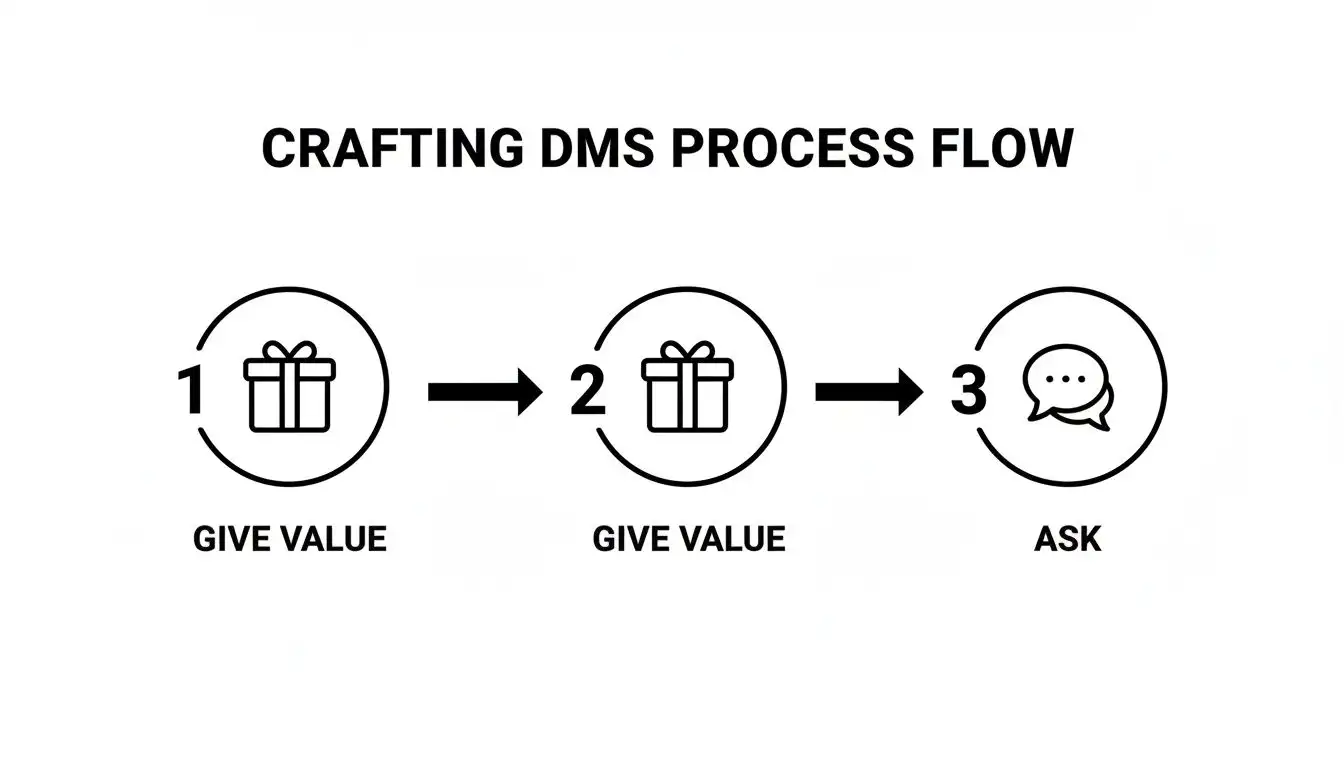
This simple flow is incredibly powerful. By leading with generosity and genuine value twice, you earn the right to ask for their time. It completely changes the dynamic of the conversation and dramatically increases your chances of getting a "yes."
Keep Your Story Straight Across Channels
Running a sequence across LinkedIn and email requires you to be organized. Your LinkedIn messages can't sound like they were written by a completely different person than your emails. This is where a good sales engagement platform and a little help from AI become your secret weapons.
Think of it like this: your outreach cadence is a story you're telling a prospect. Each touchpoint is a new chapter. If the tone and style change randomly, the story falls apart and the reader gets confused.
Modern tools don't just find contact info; they help you maintain a consistent narrative. They can even suggest personalized snippets for both your LinkedIn messages and your emails, ensuring they reference each other logically. It’s the difference between a clumsy, disjointed approach and a smooth, orchestrated performance that actually gets replies.
For a deeper dive into building these types of sequences, check out these sales cadence best practices.
Your Burning LinkedIn Prospecting Questions, Answered
Alright, you've got the playbook, but what about the curveballs? Let's be real, prospecting on LinkedIn isn't always a straight line from A to B. This is where we get into the nitty-gritty, answering those questions that pop up when you're deep in the trenches trying to turn connections into conversations.
What Do I Do If a Prospect Goes Dark on Me?
First off, take a breath. Don’t start spamming their inbox or sending a passive-aggressive "Just bumping this up..." message. It's almost never personal. They saw your message, got pulled into a meeting, then got distracted by a Slack notification or a surprisingly good cat video. It happens to all of us.
Give them a few business days to resurface. If you hear nothing but crickets, it’s time to switch up the scenery. A fantastic next move is to find their verified work email and pop in with a friendly note.
Here’s an email that works:
"Hey Sarah, we connected on LinkedIn the other day. Just wanted to follow up here since I know how easily DMs can get buried! I saw your post about scaling content teams and had a quick thought on it..."
This shows you're persistent without being a pest. Another great tactic? Go engage with their content again. A thoughtful comment on their latest article puts you back on their radar in a super low-pressure way. If you’ve sent two or three gentle nudges across different channels and still get silence, it's time to gracefully move on. Your energy is better spent on prospects who are actually engaging.
How Many Connection Requests Can I Realistically Send Each Week?
The days of "spray and pray" are long gone. LinkedIn has gotten incredibly sensitive to spammy behavior, so blasting out hundreds of generic requests is a one-way ticket to getting your account restricted.
Think quality, not quantity. The sweet spot for most people is sending between 50 and 80 highly personalized requests per week.
But here’s the real secret: the number you send is less important than your acceptance rate. A high acceptance rate (think 40% or more) tells LinkedIn's algorithm that you're a valuable networker. A low one makes you look like a spammer who bought a list and is hoping for a miracle. This is precisely why sending 20 incredible, well-researched requests will always beat sending 100 generic ones. If you do get a warning from LinkedIn, just hit the brakes on all outreach for a week and then ease back in with a much smaller, more targeted batch.
Is LinkedIn Sales Navigator Actually Worth the Money?
For anyone who is serious about B2B sales, the answer is an absolute, unequivocal "yes." Trying to prospect using the free version of LinkedIn is like trying to build a LEGO Death Star without the instruction manual. You might eventually get something that resembles a space station, but the process will be slow, painful, and probably a bit lopsided.
Sales Navigator is the whole toolkit. You get those incredible advanced search filters, the ability to build and save targeted lead lists, and real-time alerts for things like job changes or recent posts. These features aren't just nice to have; they are total game-changers.
Put it this way: If you close just one deal from a lead you found using Sales Navigator, it will likely pay for the subscription for several years over. It's not a business expense; it’s a direct investment in your pipeline.
And when you pair it with a sales intelligence platform that gives you verified contact data, your prospecting machine becomes practically unstoppable.
How Do I Know if My LinkedIn Prospecting Is Even Working?
Measuring your ROI goes way beyond vanity metrics like profile views and likes. Those are nice, but they don't pay the bills. You need to be laser-focused on the numbers that actually move the needle on your pipeline.
These are the key performance indicators (KPIs) you should be tracking like a hawk:
-
Connection Acceptance Rate: Are people actually letting you into their network? You should be aiming for 30-40% or higher.
-
Positive Reply Rate: Of the people who accept, how many are actually responding to your first message? A good target is 10-15%.
-
Meetings Booked: The number of demos or calls set each month that came directly from a LinkedIn conversation.
-
Opportunities Created: Make sure you're tagging every opportunity that started on LinkedIn in your CRM.
-
Closed-Won Deals: This is the holy grail. How much cold, hard revenue did your efforts on LinkedIn generate?
Let's say you spend five hours a week on LinkedIn prospecting. In a month, that work results in four meetings, which leads to one new $10,000 deal. You can now clearly show the immense value of that time and prove your strategy is crushing it.
Ready to stop guessing and start winning on LinkedIn? Munch is your all-in-one sales intelligence platform, combining lead discovery, data enrichment, and AI-powered personalization. Find high-intent prospects, get verified contact info, and launch outreach that gets replies. Start building your pipeline with Munch today.